
How a GPS Tracking Server worksGPS Tracking Server ทำงานอย่างไร
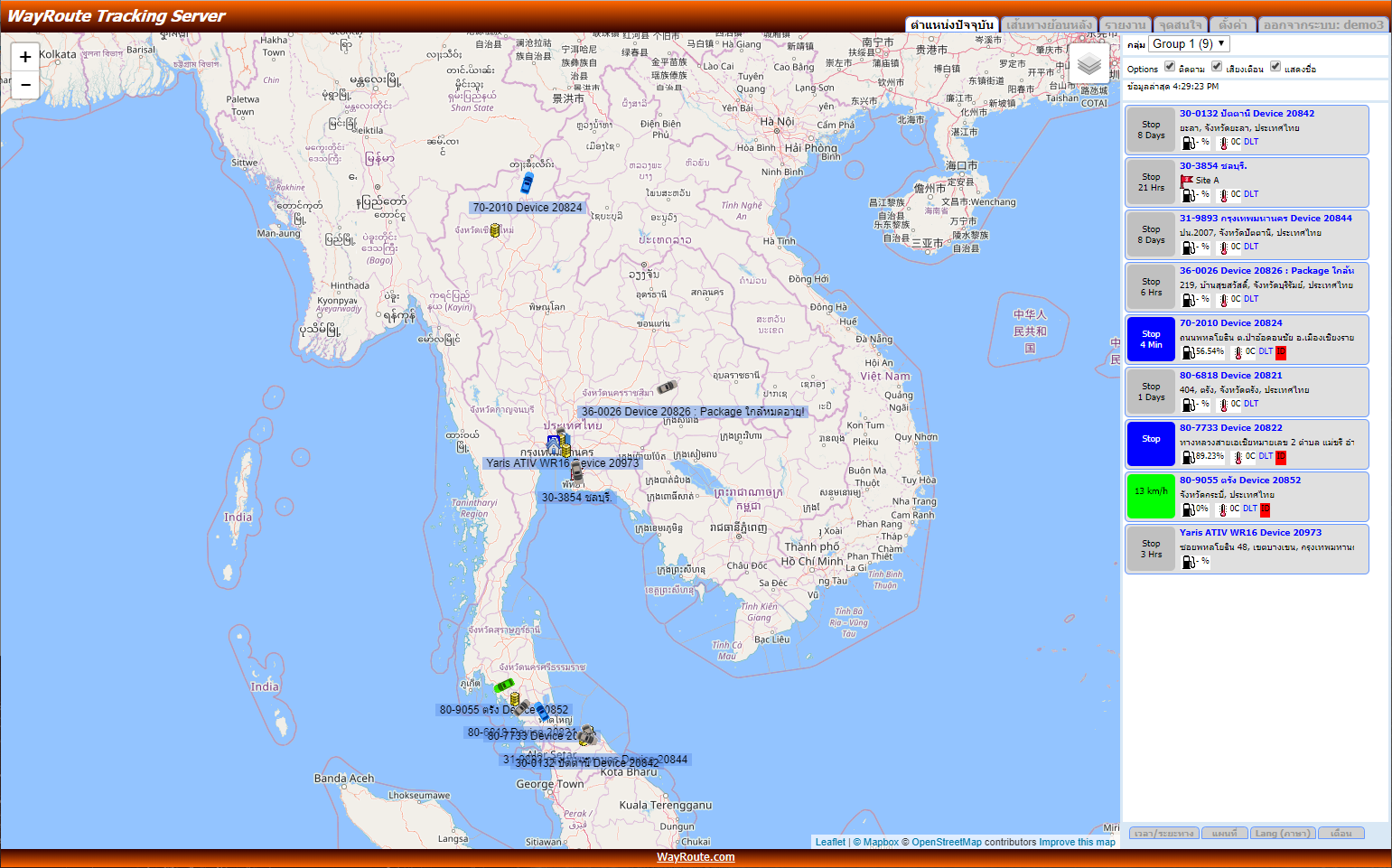
Vehicle GPS tracking runs with the WayRoute GPS Tracking Server in four steps:ระบบ GPS ติดตามรถยนต์ ทำงานร่วมกับ GPS Tracking Server ของ WayRoute เป็น 4 ขั้นตอน:
- Install a GPS tracker device in the vehicle you want to track
- The GPS tracker receives signals from GPS satellites to calculate the vehicle's coordinates
- The tracker connects to the internet over the mobile network and sends data to the WayRoute server, recording position and other data in realtime (every 30 seconds)
- Open the realtime vehicle tracking system over the internet straight away, from any computer
- ติดตั้งอุปกรณ์ GPS Tracker ติดตามรถยนต์ ไว้ที่รถที่ต้องการติดตาม
- GPS Tracker รับสัญญาณจากดาวเทียม GPS เพื่อคำนวณพิกัดตำแหน่งของรถ
- GPS Tracker เชื่อมต่อ Internet ผ่านเครือข่ายโทรศัพท์มือถือ และส่งข้อมูลไปยัง Server ของ WayRoute เพื่อบันทึกตำแหน่งและข้อมูลต่าง ๆ แบบ Realtime (ทุก ๆ 30 วินาที)
- เข้าใช้งานระบบติดตามรถยนต์แบบ Realtime ผ่าน Internet ได้ทันที จากคอมพิวเตอร์ทุกเครื่อง
Key features of the WayRoute Tracking Serverคุณสมบัติหลักของ WayRoute Tracking Server
- Web-based application — no software to install, opens straight in a browser
- Works from any computer, PC or Apple Mac, with multiple people using it at the same time
- Works on iPhone and Android phones, and tablets such as iPad and Galaxy Tab
- No server to install at your office and no system to maintain yourself
- No upgrades — you always get the latest software version when you sign in
- No map updates — you always get the newest maps when you sign in
- Built by WayRoute Enterprise Co., Ltd. Features can be changed, edited and extended at any time (Fully Customizable)
- Simple to use but complete in features, and under continuous development
- Web Base Application — ไม่ต้องติดตั้งโปรแกรม ใช้งานผ่านเบราว์เซอร์ได้ทันที
- ใช้งานได้จากคอมพิวเตอร์ทุกเครื่อง ทั้ง PC, Apple Mac และใช้งานพร้อมกันได้หลายคน
- ใช้งานบนมือถือ iPhone และ Android รวมถึง Tablet เช่น iPad และ Galaxy Tab
- ไม่ต้องติดตั้ง Server ที่บริษัท ไม่ต้องดูแลระบบเอง
- ไม่ต้อง Upgrade โปรแกรม — ทุกครั้งที่เข้าใช้งานจะได้ซอฟต์แวร์เวอร์ชันล่าสุดเสมอ
- ไม่ต้อง Update แผนที่ — ทุกครั้งที่เข้าใช้งานจะได้แผนที่ใหม่เสมอ
- พัฒนาโดยบริษัท เวย์รูท เอนเทอร์ไพรซ์ จำกัด สามารถปรับเปลี่ยน แก้ไข เพิ่มเติมฟังก์ชันได้ทันที (Fully Customizable)
- โปรแกรมใช้งานง่าย ไม่ซับซ้อน แต่มีฟังก์ชันครบถ้วน และพัฒนาอย่างต่อเนื่อง
Maps and reportsแผนที่และรายงาน
Online maps from Metamedia Technology and MapBOX include petrol stations, shopping malls, hotels and businesses in more detail than general maps, plus live traffic.แผนที่ Online จาก Metamedia Technology และ MapBOX มีข้อมูลปั๊มน้ำมัน ห้างร้าน โรงแรม และบริษัทต่าง ๆ ละเอียดกว่าแผนที่ทั่วไป พร้อมแสดงข้อมูลจราจร
Reports available:รายงานที่ใช้งานได้แก่:
- Usage report and mileage report
- Stop report
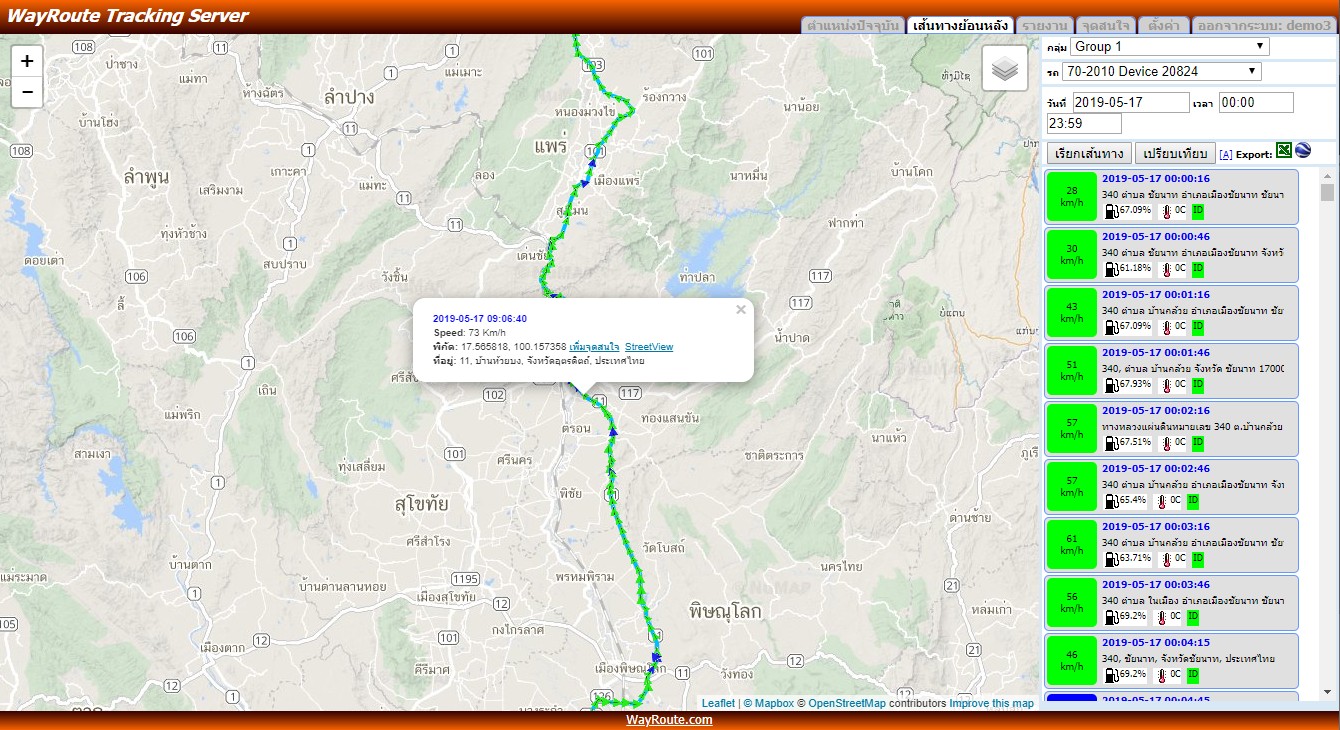
- Speed graph with position shown
- Fuel-use graph with position shown (supported models)
- Analog sensor graph and temperature graph (supported models)
- รายงานการใช้งาน และรายงานระยะทาง
- รายงานการหยุดรถ
- กราฟความเร็ว พร้อมแสดงตำแหน่ง
- กราฟการใช้น้ำมัน พร้อมแสดงตำแหน่ง (สำหรับรุ่นที่รองรับ)
- กราฟข้อมูล Analog Sensor และกราฟอุณหภูมิ (สำหรับรุ่นที่รองรับ)
Supported GPS tracker brandsรองรับอุปกรณ์ GPS Tracker ยี่ห้อต่าง ๆ
Already have GPS trackers from another supplier? Keep them — they connect to the WayRoute GPS Tracking Server right away, especially these popular models:หากติดตั้งอุปกรณ์ GPS ติดตามรถจากบริษัทอื่นอยู่แล้ว สามารถใช้อุปกรณ์ชุดเดิมเชื่อมต่อกับ WayRoute GPS Tracking Server ได้ทันที โดยเฉพาะรุ่นยอดนิยม:
- SinoTrack
- iConcox
- Jimi
- Concox GT06 / GT08
- Meitrack MVT
- Meiligao VT
- Tzone AVL
- Xexun TK-102 / 103 / 106
Don't see your brand or model? The system is Fully Customizable — WayRoute adapts device support and features to your requirements. Contact [email protected] or LINE us to check your model.ไม่พบยี่ห้อหรือรุ่นของคุณในรายการ? ระบบ Fully Customizable — WayRoute ปรับแต่งการรองรับอุปกรณ์และฟังก์ชันการทำงานได้ตามต้องการ ติดต่อ [email protected] หรือทาง LINE เพื่อสอบถามรุ่นที่ใช้งาน
Frequently asked questionsคำถามที่พบบ่อย
Do I need to install software or a server at my office?ต้องติดตั้งโปรแกรมหรือเซิร์ฟเวอร์ที่บริษัทหรือไม่
No. WayRoute GPS Tracking Server is a web-based application you open in a browser such as Google Chrome. No software install, no on-site server, no system administration.ไม่ต้อง WayRoute GPS Tracking Server เป็น Web Base Application ใช้งานผ่านเบราว์เซอร์ เช่น Google Chrome ได้ทันที ไม่ต้องติดตั้งโปรแกรม ไม่ต้องติดตั้งเซิร์ฟเวอร์ และไม่ต้องดูแลระบบเอง
Does installing a GPS tracker require cutting the vehicle's wiring?การติดตั้ง GPS ต้องตัดต่อสายไฟของรถหรือไม่
No original wiring is cut, and nothing connects to the ECU or the engine. WayRoute technicians do the installation.ไม่มีการตัดสายไฟเดิมของรถ และไม่มีการเชื่อมต่อกับระบบ ECU หรือระบบเครื่องยนต์ใด ๆ ทีมช่างจาก WayRoute เป็นผู้ติดตั้งให้
How many people can use it at once, and from where?ใช้งานพร้อมกันได้กี่คน และใช้ได้จากที่ไหน
Many users at once with no seat limit. Sign in from computers, tablets and phones on both iOS and Android — anywhere with an internet connection.ใช้งานพร้อมกันได้หลายคนไม่จำกัดจำนวนผู้ใช้งาน เข้าใช้ได้จากคอมพิวเตอร์ แท็บเล็ต และมือถือทั้ง iOS และ Android เพียงมีอินเทอร์เน็ต
Is there a mobile app?มีแอปสำหรับมือถือด้วยหรือไม่
Yes. Download WayRoute free on the App Store and Google Play to see realtime vehicle positions and replay routes from your phone.มี ดาวน์โหลด WayRoute ได้ฟรีบน App Store และ Google Play สำหรับดูตำแหน่งรถแบบ Realtime และเรียกดูเส้นทางย้อนหลังจากมือถือ